Introduction
The
following section details information for parents and students regarding the
set up and use of iPads at Murrumba State Secondary College. The iPad
BYOD program is for years 7, 8 and 9 students and is aimed to introduce
students to a diverse range of teaching and learning opportunities to prepare
them for a digital-rich future.
Our
College has been well positioned to provide effective ICT infrastructure, along with whole College WiFi access & services to support this program. We were one of the first Education Queensland BYOx Pilot
schools site operating with full wireless coverage to support our students’
digital access.
iPad Requirements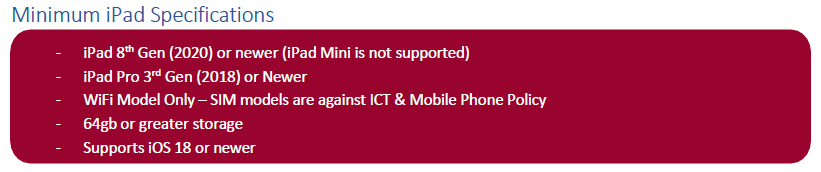
Important: The Department of Education does not support Android devices including Chromebooks
Parents/Caregivers are also asked to consider purchasing the following accessories:
- Ruggedised/protective case & keyboard
- We recommend volume restricted headphones (not earbuds)
- Installing the apps that have been outlined in the MSSC Suggested Apps List
MSSC Suggested Apps list
The
MSSC Suggested Apps list provides the iPad applications (apps) that are suggested to be installed so they can be utilised in the classroom. The document has links to help articles to assist in using the apps.
Whilst every effort is made to use free apps, in some cases a paid app is the best or only choice. To facilitate purchase of these, it is suggested that parents purchase an iTunes card for the acquisition of apps throughout the year.
Digital Learners
In response to the changing requirements of the curriculum and the rapidly shifting technological landscape, Murrumba State Secondary College has been focused on providing the best opportunity for students to engage in digital learning. Furthermore, developing contemporary 21st century skills is a priority of both the Department of Education and the Australian Curriculum, Assessment and Reporting Authority (ACARA) in the curriculum. The priority details skills such as investigating, creating, communicating and operating using ICT’s that are embedded into a range of curriculum areas in order to skill the students for the 21st Century. The Australian Curriculum involves students in learning to:
1. Make the most of digital technologies available to them.
2. Adapt to new ways of doing things as technologies evolve.
3. Limit the risks to themselves and others when using digital technologies.
Effective Digital Learners:
- are self-directed and can work independently, collaboratively and cooperatively to learn and to develop products of use with themselves and others
- display innovation and entrepreneurship
- continually develop communication and collaboration skills
- are able to research effectively and have information fluency
- have developed digital literacy and understand technology operations and concepts
- understand digital citizenship and work on issues and challenges that are real and relevant, that make a difference to them and to others
- demonstrate accountability and adaptability
- have developed skills to design, create, share and publish
- build critical and systems thinking enabling problem identification, formulation and solution, and decision making
- use ICT purposefully to engage in real research
- explore new ideas and tools in authentic contexts
- exhibit and exercise the attributes of Learning for Life.